Objednávky jsou do Česká republika republiky doručovány typicky do 48 hodin v závislosti na místu.
Bezplatné dodání do Česká republika republiky u objednávek za 1 300 Kč nebo více. Na všechny objednávky za méně než 1 300 Kč se vztahuje přepravní poplatek ve výši 500 Kč.
Předplacené přepravné UPS: DDP (clo a odvody platí společnost DigiKey)
Předplacené přepravné FedEx a DHL: CPT (clo, daně a DPH splatné v době dodávky)
Otevřený účet pro instituce a firmy splňující podmínky
Platba předem bankovním převodem
![]()
![]()
![]()
![]()


Další produkty od Plně autorizovaných partnerů
Průměrná doba expedice 1-3 dny, mohou být účtovány další expediční poplatky. Skutečnou rychlost expedice zjistíte na stránce produktů, v košíku a u pokladny.
Podmínky Incoterms: CPT (clo, odvody a příslušná DPH/daň splatná v době dodávky)
Pro více informací navštivte stránky Nápovědy a podpory
In this tutorial, we’ll demonstrate how to set up a communication channel between a ROS 2 node running on a Raspberry Pi and an Arduino-compatible microcontroller to control a simple robot.
In this tutorial, we take the next step and create a complete system using both TF2 broadcasters and listeners.
In this tutorial, we begin working with TF2, the ROS 2 library that handles coordinate transformations.
In this tutorial, we’ll explore how ROS 2 launch files simplify node orchestration.
In this tutorial, we'll explore how to use parameters in ROS 2 to dynamically configure nodes.
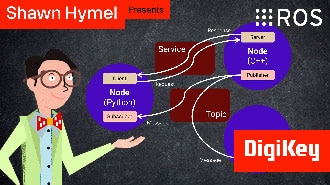
In this episode, we’ll go one step further by creating and using custom interfaces in both Python and C++. You’ll learn how to define your own message and service types and use them in publisher/subscriber and client/server architectures.
In this tutorial, we will see how services work by creating a custom server and client in C++ ROS nodes.
In this tutorial, we will see how services work by creating a custom server and client in Python ROS nodes.
In this tutorial, we’ll walk through how to write ROS 2 nodes in C++ that communicate using the publish/subscribe model.
This tutorial will walk you through creating a publisher and subscriber from scratch using ROS 2’s Python client library, rclpy.
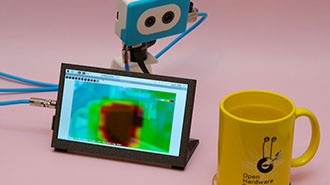
This project fuses the Raspberry Pi's camera feed with a thermal graphic overlay.
In this tutorial, we’ll dive into one of the most essential parts of working with ROS 2: the command-line interface (CLI). Before writing any code, it’s important to understand the basic tools that ROS 2 provides for exploring, debugging, and interacting with nodes, topics, and services.
Děkujeme!
Sledujte ve svých příchozích zprávách novinky a∘aktualizace od společnosti DigiKey!
Zadejte prosím e-mailovou adresu
Zaškrtněte prosím políčko